Subscribe to newsletter
Subscribe to our newsletter and get updates on the newest posts we release.
By subscribing you agree to our Privacy Policy


Apple home key is the feature that opens a door by holding an iPhone or Apple Watch against the lock. It is not a lock, and it is not the Apple Home app. It is a key kept in Apple Wallet, next to a bank card. It only works on locks built to take it. Most people first see the words while shopping for a smart lock, because some locks say so on the box and plenty of others do not say it at all.
Apple says it plainly in its own iPhone guide: not all locks that work with the Home app support home key. So you can buy a smart lock, pair it to a phone, unlock it from the sofa, and then stand at the door tapping the phone against it. The lock does not open. That lock has no reader inside it, so a phone is no use at the door. Getting this wrong costs twice. You keep a lock that never does the one thing you bought it for, or you pay for a second lock installation a month later.
By the end you will know what Apple home key does, why a lock can work in the Home app and still not tap open, which locks tap open today, what changes at your own door, and what happens when a battery dies. I am Eli Itzhaki, and I fit and open locks for a living.
Key takeaways
A new deadbolt arrives cut to its own key, so have the locksmith match it to the house key already in your pocket.
A smart lock can work in the Apple Home app and still not support Apple home key, so the listing has to say home key, not only Apple Home or Matter.
Apple home key keeps working for up to five hours after an iPhone runs out of charge, and it stops entirely once the lock's own batteries are flat.
Apple now sells its own deadbolt, built with LG, which is the Korean electronics maker, and that one opens as you walk up to it instead of waiting for a tap.
What Apple home key actually is
Short answer: Apple home key is a digital key kept in Apple Wallet, and you open the door by holding an iPhone or Apple Watch against the lock.
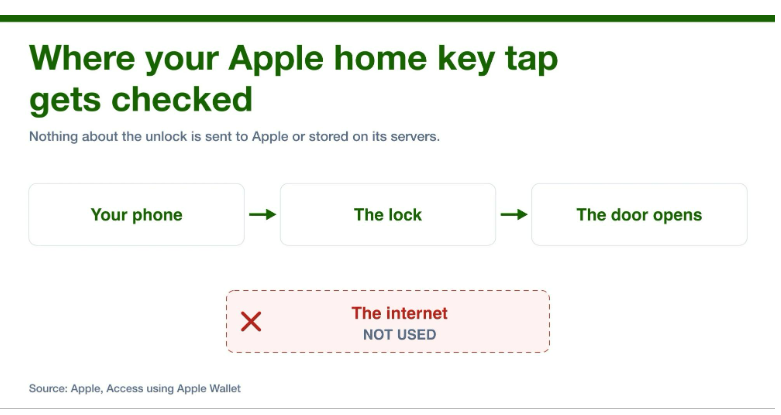
The whole check happens at the door, between the phone and the lock, with no internet in the middle.
Express Mode opens the door without you unlocking the phone first. Switch it off and the door opens only after Face ID, Touch ID or your passcode.
Everyone in the household gets the same key, by itself, as soon as the lock is paired.
Where that comes from: Apple's own guide to unlocking your door with a home key.
Here is what physically happens when somebody walks up and taps. The phone holds the key on a sealed chip, which Apple calls the Secure Element, and that chip is the only place on the phone the key is stored. The lock has a small radio reader behind its face. It runs on NFC, which is the short range radio a phone already uses to pay at a card machine. You hold the phone to the marked spot, the reader checks the key on that chip, and the lock turns. Nothing is sent to Apple and nothing goes out to the internet, and Apple's security guide puts that in writing: when or where you use a key in Apple Wallet is never shared with Apple or stored on Apple servers.
Tapping to open is the easy part once the lock is on the door. The mistake people make happens earlier, in the shop.
Why a lock can work in the Apple Home app and still not tap open
Three different things get sold with Apple's name on them, and only one of them is the tap.
The Apple Home app is the app on the phone that locks and unlocks the door, shows whether it is locked, and locks it at bedtime if you set it to. Plenty of lock listings still say HomeKit, and for a buyer that means the same app. Matter is a shared standard that lets a lock from any brand join that app in the first place. Apple home key is the tap at the door, and it needs that extra part inside the lock, plus the lock maker paying Apple to add the feature. A home hub such as an Apple TV or a HomePod belongs to the first two as well: Apple states that you must set up a home hub to add Matter accessories to the Home app, and the tap at the door needs no hub. A lock can have the first two and not the third, which is why Apple's guide says plainly that not all Home app compatible locks support home key.
Here is the check that takes ten seconds before you pay. The words home key have to appear in the product listing itself, not in a review somebody wrote about it. Works with Apple Home is a different claim. Matter certified is a different claim again. When you cannot find the words, assume the answer is no, because every maker that has paid for the feature says so in big letters.
Which locks tap open today, and the one Apple sells in December
The list of locks is still short, and it changed this month. On October 13, 2026, Apple announced the Apple Home Collection, a set of home accessories built with LG, and one of them is a deadbolt. It opens a different way from the tap locks. It uses ultra wideband, which is shortened to UWB: a radio precise enough to tell how far away you are and which side of the door you are on, so this UWB smart lock opens as you walk up with the phone still in a pocket. It also takes a pin code and it has a hidden slot for a real key. Apple prices it from $349.95 and the collection arrives in December 2026.
Schlage lists Apple home key support on one lock of its own, the Encode Plus. Three locks worth knowing, each one confirmed by the company that makes it:
Lock | What the phone does | When you can buy it |
|---|---|---|
The phone matters as much as the lock. Schlage says the Encode Plus wants iOS 18 or newer on the phone doing the tapping, and an iPhone XS or newer, which is any iPhone sold from 2018 on, to pair it, so somebody with an older phone opens the door with a code instead.
Now you know which lock to look for. The next question is what the swap does to your own door, and to the key already in your pocket.
What changes at your own door
Every lock above is a deadbolt, so fitting one means taking the current deadbolt off and putting this one in its place. On a normal front door that is a screwdriver job and an hour at most, because the holes are already there.
One smaller thing annoys people a week later. The new deadbolt arrives with its own key, cut to its own pattern, so the key that used to open the front door now opens the back door and nothing else. You end up carrying two house keys to fix a problem you bought the lock to stop. Schlage says outright that its locks with a keyhole, whether mechanical or smart, can be keyed alike or rekeyed. A locksmith takes the key part out of the new lock, changes the small pins inside so it matches the key already in your pocket, and puts it back. Ten minutes, and you are back to one key. It is the same rekeying job people do when they move in.
So the door is done and the key is matched. The question people ask me next is always the same one. What happens when something runs out of charge?
The two batteries, yours and the lock's
There are two batteries to think about, and people only worry about the wrong one.
The phone is the one they ask about, and the phone is fine. Express Mode keeps working after the battery runs out: power reserve works for up to five hours with cards, passes and keys that have Express Mode turned on, so a phone that died on the drive home still opens the door. The same support page names the catch. Turn the phone off yourself and the feature is gone.
The lock is the one to plan for. It runs on its own batteries. When those run out, everything electric in it stops. Schlage says so in its own quick start guide for the Encode Plus: the warning light goes solid when the battery is critical, and the lock will not work without new batteries. No tap, no code, no app, and a phone at 100 percent changes nothing. What is left is the keyhole, if that lock has one.
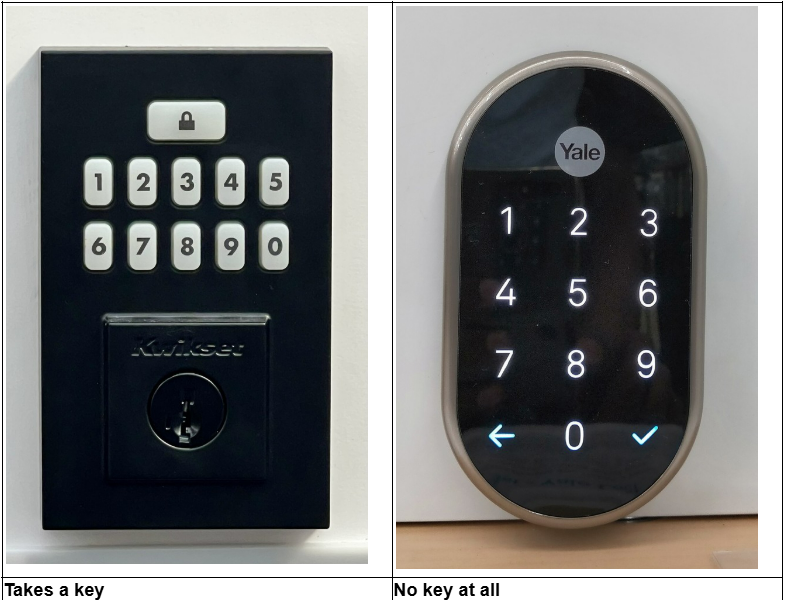
Two smart lock faces: one takes a key, one does not. Once the lock's batteries are flat, only the left one still opens.
Checking for a keyhole takes five seconds and decides your whole backup plan. Most of these locks keep one, and some are built without one on purpose. If yours has a keyhole, the key from the box goes somewhere you can reach while standing outside: a wallet, a car, a neighbor, a family member down the road. Inside the house is the one place it is no use. If yours has no keyhole, the batteries are your only backup, so change them the week the low battery light comes on, not the morning the lock stops.
What you get when we fit the lock for you
Plenty of people fit these themselves, and that is fine. People call us for three reasons: the door, the key ring, or the time of night.
We come to the door with the lock and the tools, so a swap that runs into a warped frame gets finished the same visit instead of leaving a hole in a front door overnight. We match the new deadbolt to the key already in your pocket, so one key still opens everything. And when the lock is already on and you are on the wrong side of it, our house lockout service runs around the clock, which is the call we get when the batteries run out at noon and somebody comes home to it at six.
Questions people ask about Apple home key
Does Apple home key work on an Android phone? It does not work on one. The key only works on Apple phones and Apple watches. Some locks carry a second digital key for Android owners: Aqara lists a Samsung Wallet key on the U400.
Somebody is house sitting and they do not own an iPhone. How do they get in? Give them a code instead of a key. In the Home app you touch and hold the lock, tap Accessory Settings, then Manage Access, then Add Guest, name them, set a code and send it.
My phone was stolen. Can somebody use it on my door? Only until you shut it down, and you can do that from any browser. Open Find My, pick the missing phone or watch, and switch on Lost Mode. Apple's security guide lists Lost Mode and a remote erase as the two ways a key in Wallet is made inactive or removed.
Buying a Smart Lock, or Locked Out of the One You Have?
Whether you want a tap unlock fitted properly, a new deadbolt matched to the key already in your pocket, or somebody out tonight because the batteries died and you are standing outside your own door, Keyzoo covers it. Call +1 888-539-9660 or book online, and a technician comes to you.