Subscribe to newsletter
Subscribe to our newsletter and get updates on the newest posts we release.
By subscribing you agree to our Privacy Policy


You want a new code on your door lock. The keypad gives you one in about thirty seconds, and most people stop there, which leaves the old codes live. Schlage ships these locks with two working user codes on a sticker, and both open the door until you delete them.
Schlage builds the BE365, FE575 and FE595 to hold 19 user codes at once. If you leave them in, a lock you have had five years carries a dozen numbers you have forgotten. Each one is somebody who can still walk in.
This guide walks you through the job step by step, so by the end you will know how to find the two codes your lock came with, how to change the code on a Schlage keypad lock, how to change the code on a Kwikset SmartCode, and whether a new code locks out an old key.
I am Eli Itzhaki, and I write these guides for KeyZoo Locksmiths. A code change and a key change are two different jobs, and I will show you where the keypad stops.
Key takeaways
Your lock runs on two codes, and mixing them up is why most sequences fail. The six-digit programming code makes changes, and four-digit user codes open the door.
A keypad lock takes the programming code first, and a Connect touchscreen wants the Schlage button first. Steps copied off the internet fail on that alone.
A new code locks out old codes and no keys, so a move or a breakup needs a rekey too.
Step one) Find the two codes your lock came with
Find your programming code first. That six-digit number puts the lock into programming mode. It does not open the door. It only adds and removes the codes that do.
Schlage prints it on a sticker in two places, because people lose paperwork. One sits on the back of the keypad, so reading that one means taking the keypad off the door. The other is on the front of the paper user guide, with the two default user codes, User Code A and User Code B.
Write all three numbers down somewhere other than your door. Lose it and a factory reset is your only route back in, and Schlage's keypad user guide says in capital letters that customer service cannot retrieve lost default codes.
The longer you leave the factory codes in place, the more people hold a number to your door. So which keypad is on yours? These three cover nearly every Schlage:
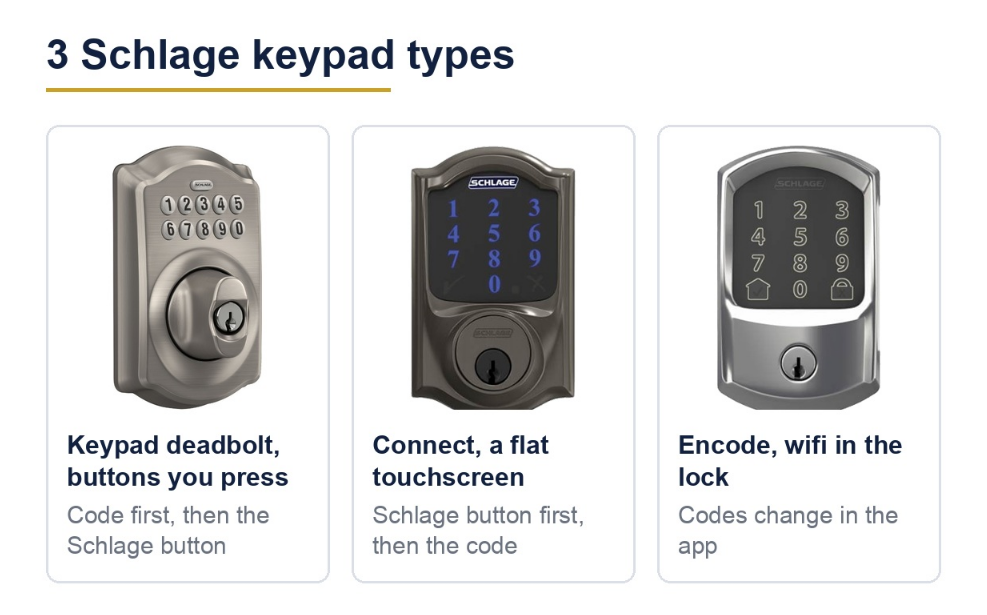
The three Schlage keypad families, and the order each one takes.
Step two) How to change the code on a Schlage keypad lock
Enter your six-digit programming code, press the Schlage button, press 1, then type the new four-digit code twice. That covers the BE365 deadbolt, the FE575 lever and the FE595 lever, and Schlage publishes it in its own support guide.
Here is the same sequence, press by press:
Type the programming code. Wait for three orange flashes and three beeps.
Press the Schlage button. The keypad lights up blue.
Press 1. Wait for the same flashes and beeps.
Type the new four-digit code. Wait for the flashes and beeps.
Type it again. One green flash and one long beep means the code is in.
Two rules decide whether the lock takes your number. It cannot match the first four digits of the programming code, and it cannot match a code already in the lock.
Now the part that catches people out. These locks have no change-a-code function, so a code change is two jobs: add the new code, then delete the old. Deleting runs the same way with one button different: programming code, Schlage button, press 2, then the unwanted code twice.
Changing the programming code runs the same way, with 3 in place of 1. Delete the two factory codes off your sticker now. If you leave them, two numbers you never chose open your door for the life of the lock.
Schlage gives one more reason to come back: change codes now and then so the buttons wear evenly. Four worn digits narrow the guessing for anybody at your door.
Step three) Do it on a Connect touchscreen or an Encode
Check which one you have, because a Connect touchscreen and an Encode each want a different order:
Your lock | Where codes get changed |
|---|---|
A sequence copied off a search result is not the same as your model's. Type the code first on a touchscreen and the keypad never enters programming mode.
The Encode moves the job into your phone, where you can name each code and see whose you delete. The keypad route still works, with the house icon to add and the lock icon to delete, but only on a lock never set up in the app.
Pairing an Encode with the app deletes the programming code, Schlage says, so as of November 2026 no number is left to type after setup. Keep one trusted code live rather than wiping them all, because a dead phone at the door leaves you no way to make a new one.
Step four) Change the code on a Kwikset SmartCode
Open your door first, because Kwikset says to, and a shut door mid-sequence is how people lock themselves out. The program button sits on the inside half of the lock. Press and release it with the SmartKey tool, or a paper clip.
Then press 1 for a short beep and a green flash, press the Kwikset button, and type your new code. Kwikset allows 4 to 8 digits, and the first four digits of each one must differ from every other code. Press 2 instead of 1 to delete a code, then type the unwanted number twice.
How many codes your lock holds depends on the model, and a full lock has no room for the next number you try. Schlage and Kwikset publish those limits. Three common ones:
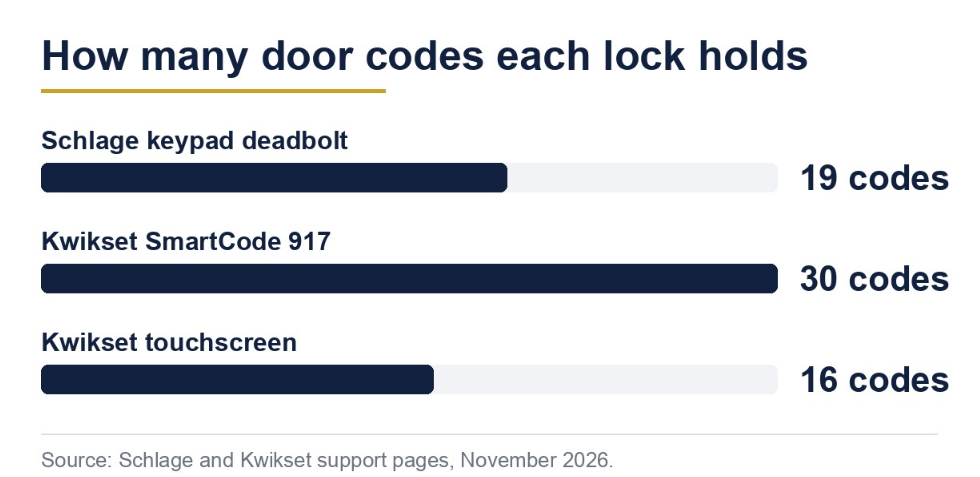
A full lock looks like a broken lock, so what do you do next? Delete a number you no longer use, and call a locksmith if the keypad takes codes but will not turn.
Why is the keypad flashing red and ignoring you?
The keypad flashes red for three ordinary reasons: a wrong code, a weak battery, or vacation mode left on. Schlage's guide prints the full list, and a broken lock sits near the bottom.
What the lock does | What it means |
|---|---|
Batteries cause most of this. Type too many wrong codes and you wait 30 seconds before the keypad takes one again. A weak battery runs the lights and not the motor, so you get a green flash and no movement.
If you ignore that slow unlock, the battery dies with you outside. Change it before any programming sequence.
People read a Schlage lock blinking red as a dead lock. It almost never is. A Schlage lock not working at the keypad, or a Kwikset lock not working on fresh batteries, is nearly always one of those five rows.
Does a new code lock out an old key?
No, a new code does not lock out an old key. It locks out old codes, and nothing else.
Every Schlage keypad deadbolt has a keyhole. Schlage's guide says why: with a dead battery or no code to hand, the key gets you in. Kwikset builds the same override into a SmartCode.
Picture the house you just bought. You change the code on day one, which clears the numbers the last owner passed around. Their keys are another matter, and so are the copies their painter and grown children hold. Until you rekey, every key cut in the last ten years opens your door.
A new code is not the same as a new key. A rekey kills those copies. We open the keyed cylinder, swap the small pins inside, and cut you new keys. Your hardware stays on the door, which is why a rekey beats a new lock on price.
Kwikset gives you a shortcut. A SmartKey cylinder lets you do that pin swap yourself, in three steps. Kwikset is clear about the catch: it needs the current key plus the SmartKey tool, so only somebody with both can rekey it.
Schlage sells no equivalent, so on a Schlage the keyed cylinder is a locksmith job. Call us and we rekey every lock in the house to one new key in a single visit.
What you have once the codes are yours again
Once the codes are yours, you have a door you can account for. You will have one code for the household and one guest code you delete when the cleaner leaves. Your programming code sits in a drawer, so a dead keypad costs a battery, not a service call.
After that, your door opens to the keys you handed out and nothing else. Moving in? Our lock and key checklist runs the whole house.
Questions people ask us about door codes
How do I delete a code I cannot remember?
You cannot delete a number you cannot type, so your only route is a clean sweep. Press 6 rather than the 2 in step two, because 2 asks for the number you have forgotten. Enter the programming code, hit the Schlage button, press 6, then type the programming code again, because the lock will not finish a wipe without it.
How do I reset a Schlage lock without the programming code?
Run a factory reset. Disconnect the battery, then press and release the Schlage button.
Then do two things inside ten seconds: reconnect the battery, and hold the Schlage button until it lights green. Read the warning in step one first: a reset erases every code you have set.
Get your codes and your keys back under your control
Changing a code takes a minute. Changing who can open your door is the bigger job, and the code is only half of it.
KeyZoo rekeys homes and businesses, programs keypads, and cuts keys at kiosks in 11 states. Send us your zip code. We will tell you what we can get to you today.
Book a locksmith now or call 888-539-9660.